

In today’s digital age, our homes are filled with connected devices—from smartphones and laptops to smart TVs and home assistants. While these technologies make life easier, they also expose personal information to cyber threats. Following cybersecurity tips for home users is essential to protect sensitive data and maintain online safety.
- Understand Common Cyber Threats
Home users face a variety of cyber threats including malware, phishing, ransomware, and identity theft. Malware can infect devices through downloads or email attachments, while phishing attempts trick users into revealing passwords or financial information. Ransomware locks devices until a ransom is paid, and identity theft can result from leaked personal data. Awareness of these threats is the first step toward strong cybersecurity at home.
- Use Strong and Unique Passwords
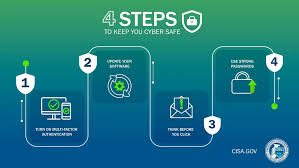
Passwords are the first line of defense. Using strong, unique passwords for each account reduces the risk of unauthorized access. Avoid using easily guessable information like birthdays or common words. Consider a password manager to securely store and generate complex passwords. Two-factor authentication (2FA) adds an extra layer of security, requiring a second verification step when logging in.
- Keep Software and Devices Updated
Regularly updating operating systems, software, and apps ensures devices are protected from known vulnerabilities. Updates often include security patches that prevent hackers from exploiting weaknesses. Enable automatic updates whenever possible to maintain the latest protections without constant manual checks.
- Secure Your Wi-Fi Network
A secure Wi-Fi network is crucial for home cybersecurity. Change the default router password and use strong encryption, such as WPA3, to protect your network. Disable remote access features unless necessary and regularly monitor connected devices to detect unauthorized users. Setting up a guest network for visitors can also help isolate your main devices from potential threats.
- Install Antivirus and Firewall Protection
Antivirus software scans for and removes malicious programs, protecting devices from infections. Firewalls act as barriers between your devices and potential attackers, monitoring incoming and outgoing traffic. Both tools are essential for safeguarding personal computers, laptops, and mobile devices against cyber threats.
- Be Cautious with Emails and Links
Phishing attacks often come through emails, messages, or suspicious links. Home users should be cautious when opening emails from unknown senders and avoid clicking on unsolicited links or downloading attachments. Verify the sender’s authenticity and consider using email filtering tools to reduce spam and malicious content.
- Backup Your Data Regularly
Regular backups protect valuable information from loss due to malware, ransomware, or hardware failure. Use external hard drives, cloud storage, or automated backup services to ensure critical files and documents are securely stored. Test backups periodically to confirm they can be restored successfully in case of an emergency.
- Educate Family Members
Cybersecurity is not just an individual responsibility. Educate all household members about safe online habits, such as recognizing phishing attempts, using secure passwords, and avoiding suspicious downloads. Children and elderly family members may be more vulnerable, so providing guidance and monitoring usage can prevent accidental security breaches.
- Use Encryption and Secure Browsing
Encrypt sensitive files and communications to prevent unauthorized access. Use secure browsers and always look for HTTPS in website URLs, which indicates encrypted connections. VPNs (Virtual Private Networks) can provide additional privacy when using public Wi-Fi or accessing sensitive information online.
- Stay Informed About Cybersecurity Trends
The cybersecurity landscape evolves constantly, with new threats emerging regularly. Following tech news, subscribing to security newsletters, and joining online forums can help home users stay informed and proactive. By keeping up with the latest developments, users can adopt new protective measures before threats become widespread.
Conclusion
Implementing effective cybersecurity tips for home users is crucial in today’s connected world. By understanding common threats, using strong passwords, securing networks, keeping devices updated, and educating family members, individuals can significantly reduce the risk of cyberattacks. Combining these practices with regular backups, antivirus protection, and secure browsing ensures a safer online environment for everyone at home. Protecting your digital life is an ongoing effort, but the right measures make it manageable and effective.

1 Comment
Pingback: Cybersecurity in 2025: Emerging Threats and AI-Driven Defenses